How does EVPN-VXLAN work?
VXLAN
VXLAN is a standards-based overlay mechanism that encapsulates Layer 2 Ethernet frames inside IP/UDP packets (MAC-in-UDP) which can be forwarded across a Layer 3 IP network.
Let's start with a review of our basic Ethernet frame:
---
config:
  packet:
    rowHeight: 32
    bitWidth: 96
    bitsPerRow: 12
    paddingX: 5
    paddingY: 5
  theme: 'dark'
---
packet
title Ethernet Frame
+6: "Destination MAC Address"
+6: "Source MAC Address"
+4: "802.1Q VLAN Tag"
+2: "EtherType"
+46: "Data (42-1500 bytes)"
+4: "Frame Checksum"
The minimum Ethernet frame size is 64 bytes. The typical maximum frame size is 1518 (no VLAN tag) or 1522 (with VLAN tag). The frame check sequence is not included in these lengths.
In that frame, the payload data could be an IP packet, some layer 2 control traffic, or something else.
VXLAN encapsulates this Ethernet frame with a VXLAN header, a UDP header, and an IP header, so the payload data can be forwarded across a routed network. When the VXLAN header is added, the inner frame check sequence is dropped.
The VXLAN header includes a 24-bit VXLAN Network Identifier (VNI), similar to a VLAN tag, but with a range of 16 million.
The VXLAN header is 8 bytes long:
---
config:
  packet:
    rowHeight: 32
    bitWidth: 128
    bitsPerRow: 8
    paddingX: 5
    paddingY: 5
  theme: 'dark'
---
packet
title VXLAN Header
+1: "Flags"
+3: "Reserved"
+3: "VXLAN VNI"
+1: "Reserved"
The UDP header is also 8 bytes long. By default, VXLAN uses destination port number 4789. The source port number is usually calculated from a hash of the inner packet's fields. This helps facilitate ECMP routing.
---
config:
  packet:
    rowHeight: 32
    bitWidth: 128
    bitsPerRow: 8
    paddingX: 5
    paddingY: 5
  theme: 'dark'
---
packet
title UDP Header
+2: "Source Port"
+2: "Destination Port"
+2: "Length"
+2: "UDP Checksum"
Finally, the IP header is added. The destination IP address of the VXLAN packet is a VTEP. A VTEP is a physical or logical network device that encapsulates and decapsulates VXLAN frames. Each device that routes the packet must have a route toward the VTEP address.
---
config:
  packet:
    rowHeight: 32
    bitWidth: 128
    bitsPerRow: 8
    paddingX: 5
    paddingY: 5
  theme: 'dark'
---
packet
title IPv4 Header
+1: "Vers./Header Length"
+1: "ToS"
+2: "Total Length"
+2: "Identification"
+2: "Fragmentation Flags/Offset"
+1: "TTL"
+1: "Proto"
+2: "Header Checksum"
+4: "Source Address"
+4: "Destination Address"
When we put it all together, our encapsulated Ethernet frame looks like this:
---
config:
  packet:
    rowHeight: 32
    bitWidth: 128
    bitsPerRow: 8
    paddingX: 5
    paddingY: 5
  theme: 'dark'
---
packet
title Ethernet Frame in VXLAN IP Packet
+1: "Vers./Header Length"
+1: "ToS"
+2: "Total Length"
+2: "Identification"
+2: "Fragmentation Flags/Offset"
+1: "TTL"
+1: "Proto"
+2: "Header Checksum"
+4: "Source Address"
+4: "Destination Address"

+2: "Source Port"
+2: "Destination Port"
+2: "Length"
+2: "UDP Checksum"

+1: "Flags"
+3: "Reserved"
+3: "VXLAN VNI"
+1: "Reserved"

+6: "Destination MAC Address"
+6: "Source MAC Address"
+4: "802.1Q VLAN Tag"
+2: "EtherType"
+46: "Data (42-1500 bytes)"
Now we have our Ethernet frame enclosed with an IP packet that can be routed and forwarded!
Of course, in order to put it on the wire, we need to wrap it in a new Ethernet frame...
---
config:
  packet:
    rowHeight: 32
    bitWidth: 128
    bitsPerRow: 8
    paddingX: 5
    paddingY: 5
  theme: 'dark'
---
packet
title Ethernet Frame in VXLAN IP Packet in Ethernet Frame
+6: "Destination MAC Address"
+6: "Source MAC Address"
+4: "802.1Q VLAN Tag"
+2: "EtherType"

+1: "Vers./Header Length"
+1: "ToS"
+2: "Total Length"
+2: "Identification"
+2: "Fragmentation Flags/Offset"
+1: "TTL"
+1: "Proto"
+2: "Header Checksum"
+4: "Source Address"
+4: "Destination Address"

+2: "Source Port"
+2: "Destination Port"
+2: "Length"
+2: "UDP Checksum"

+1: "Flags"
+3: "Reserved"
+3: "VXLAN VNI"
+1: "Reserved"

+6: "Destination MAC Address"
+6: "Source MAC Address"
+4: "802.1Q VLAN Tag"
+2: "EtherType"
+46: "Data (42-1500 bytes)"

+4: "Frame Checksum"
A note about MTU
Ethernet devices typically have an MTU of 1500 bytes. That means 1500 bytes of payload can be transmitted in an Ethernet frame, which turns out to be about 1518 bytes overall. After we encapsulate the frame with VXLAN, UDP, and IP headers, it's packed into a new Ethernet frame for forwarding. The additional headers add 50-54 bytes to each packet, meaning that your underlay network must be able to forward frames with payloads larger than 1500 bytes, or you must reduce the size of your inner frames. In datacenter deployments, an underlay MTU of at least 9000 bytes is typical.
A note about efficiency
If the internal frame payload is only 42 bytes, VXLAN more than doubles the amount of data that needs to be forwarded to deliver the packet. However, if the internal frame has a 1500-byte payload, VXLAN only adds about 3% overhead. Modern switch ASICs have VXLAN encapsulation/decapsulation support built into the hardware, so building the VXLAN packet has a minimal impact on forwarding efficiency.
BGP-EVPN
MP-BGP is used to exchange EVPN information. In order to establish a BGP session, we need:
- a transport session (usually TCP over IPv4 or IPv6)
- address families (AFI / SAFI)
- next hop address family
A typical BGP session between two routers exchanging IPv4 routes will use the following:
- TCP transport over IPv4
- AFI 1 (IPv4) / SAFI 1 (unicast)
- next hop is an IPv4 address
A typical BGP session between two routers exchanging IPv6 routes will use the following:
- TCP transport over IPv6
- AFI 2 (IPv6) / SAFI 1 (unicast)
- next hop is an IPv6 address
In an BGP-EVPN session, routers exchange EVPN routes using the following:
- TCP transport over IPv4 or IPv6
- AFI 25 (L2VPN) / SAFI 70 (EVPN)
- next hop is the IPv4 or IPv6 address of a VTEP
For our purposes today, we will make the following assumptions:
- Underlay transport is single stack IPv4
- BGP sessions will be established between IPv4 addresses
- VTEPs will be identified by IPv4 addresses
But don't worry—we can still carry IPv6 information inside the EVPN!
EVPN Routes
Once we establish BGP sessions between our routers, what kind of information do they exchange?
Route Type 1: Ethernet Auto-Discovery (A-D) Route
Type 1 routes signal the presence of a multihomed Ethernet Segment in the EVPN fabric. VTEPs participating in a given Ethernet Segment use this type of route to discover each other. This is helpful for several reasons:
- Load Balancing / Aliasing: provides a mechanism to avoid duplicating BUM traffic and distribute traffic across VTEPs sharing the same Ethernet Segment
- Fast Convergence: provides a way to signal that many MACs moved or were withdrawn at once
A Type 1 route contains the following information:
- Route distinguisher - uniquely identifies the route in the network based on source router and VRF
- Ethernet Segment Identifier (ESI)
- Route target corresponding to the respective MAC/IP VRF(s)
Route Type 2: MAC/IP Advertisement Route
Type 2 routes are the most common route type in an EVPN-VXLAN network. Type 2 routes are used to share MAC learning and ARP information in the fabric. This is how EVPN implements the Layer 2 control plane.
A Type 2 route contains the following information:
- Route distinguisher
- Ethernet Segment Identifier (ESI)
- MAC address
- IP address length (to indicate whether it is an IPv4 or IPv6 address, or zero if no IP address is included)
- IP address (optional, IPv4 or IPv6 — same route type!)
- Ethernet Tag ID (VLAN/VNI)
Route Type 3: Inclusive Multicast Ethernet Tag Route
Type 3 routes are used to handle BUM traffic. Each VTEP device advertises a Type 3 route to subscribe to BUM traffic for a particular EVPN instance (EVI). Each VTEP in the network uses the Type 3 routes in the routing table to maintain a list of VTEPs that belong to each broadcast domain.
When a VTEP receives BUM traffic in a particular EVI, it forwards the traffic to all other VTEPs in the EVI via ingress replication.
Route Type 4: Ethernet Segment Route
Similar to Type 1, Type 4 routes are used by VTEPs to announce their presence and discover all of the other VTEPs in the same multihomed Ethernet Segment. A Type 4 route signals that a VTEP is eligible to be a Designated Forwarded (DF) for the given Ethernet Segment. The VTEPs collectively perform a Designated Forwarded (DF) election.
Multihomed Ethernet Segments (ESI-LAGs) can be configured as single-active or all-active.
In single-active ESI-LAG, the DF forwards all of the traffic for a given VLAN in a particular Ethernet Segment. The other members stay in a standby state.
In all-active ESI-LAG, the DF is responsible for forwarding BUM traffic.
Route Type 5: IP Prefix Route
Type 5 routes are used to advertise IP prefixes. EVPN can carry routes learned from other protocols. Each route is associated with its respective IP VRF using a Route Target community string attached to the route.
- Length (34 for IPv4 prefix or 58 for IPv6 prefix)
- Route distinguisher
- Ethernet Segment Identifier (ESI)
- IP prefix length
- IP prefix
- Gateway IP address
The next hop for an EVPN Type 5 route is called an Overlay Index, and can be an IP address, an ESI, or a MAC address.
The magic of Type 5 routes is that IP VRFs can re-use the EVPN underlay connections with no additional routing protocol instances!
Consider a simple network with four routers participating in OSPF:
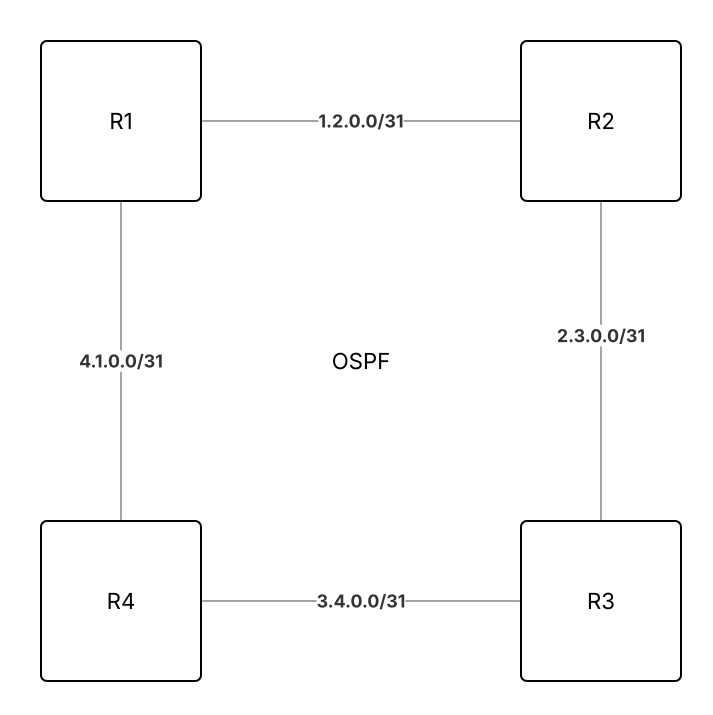
If we want to add a VRF to this network, we need to create it on the routers, build new transits in the VRF, and start another OSPF process for the new VRF:
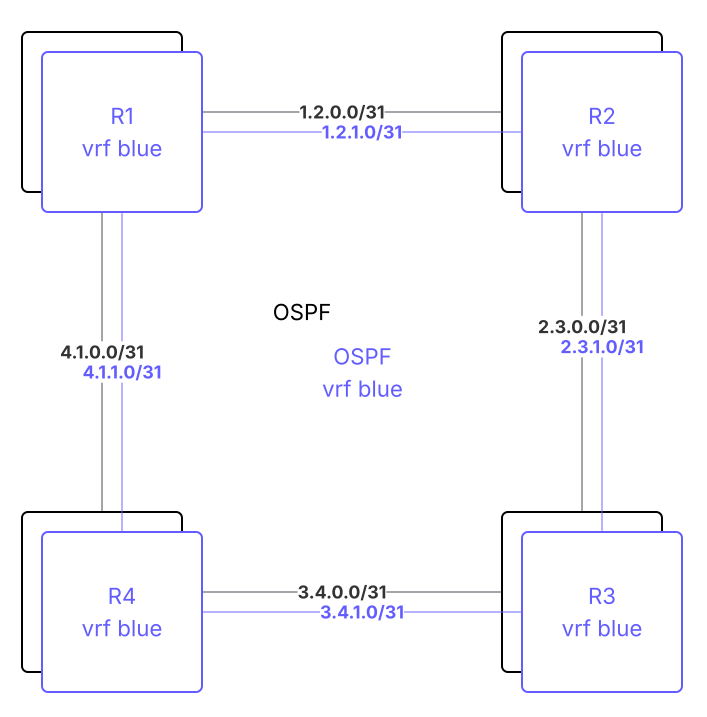
Not too bad. We can even add a third one without too much work:
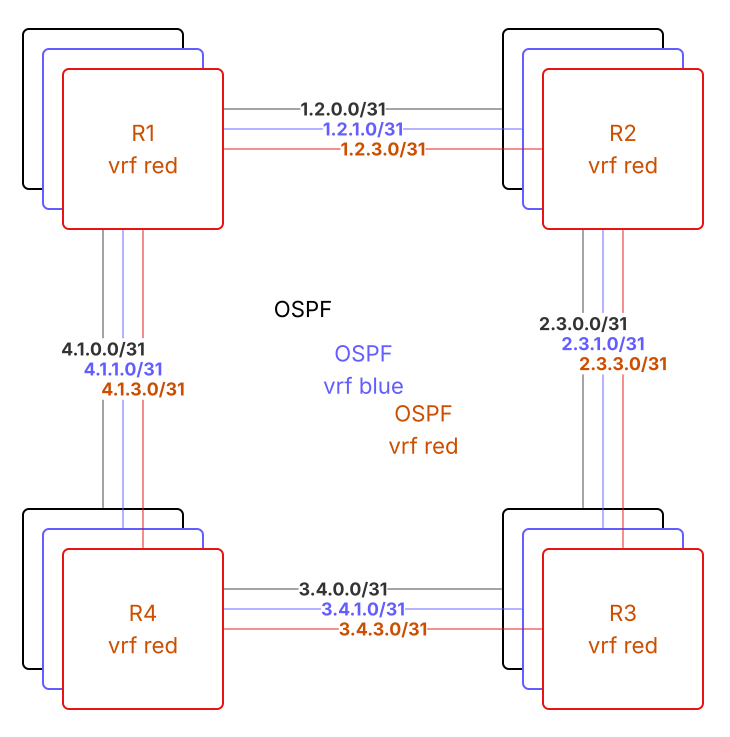
But... what if we want 4, 5, or 10 VRFs? And what if we have 10 routers in some kind of partial mesh topology instead of four in a ring?
To build 10 VRFs in a spine-leaf topology with 10 nodes would require 160 (!) transit links and 10 OSPF processes (or 20, if you also need OSPFv3). Each router has to maintain state for the paths in all of the VRFs, consuming a large amount of resources.
By using EVPN, we can share a single underlay with a single routing protocol process and make the underlay completely
transparent to the VRFs on top! 