Proof of Concept
The lab / demo network consists of the following:
-
(2) Juniper EX4400-48P switches
- EX4400 is our standard IDF closet switch model at this office. Not something we would typically use for a core device, but they support all of the features we need for a demo.
-
(2) Juniper EX2300-C-12P switches
- One for management connectivity and one as a layer 2 IDF
-
(1) Juniper EX4100-48MP switch
- As an EVPN-VXLAN fabric-connected IDF
In this section, we will:
- Build the collapsed core
- Underlay
- Establish Ethernet and IP connectivity between core nodes
- Configure underlay routing protocol (OSPF)
- Verify reachability of loopback interfaces
- Overlay
- Establish BGP-EVPN protocols between nodes
- Enable VXLAN dataplane
- MAC/IP VRFs
- Create VLANs and assign VNIs
- Create IRB (layer 3) interfaces in fabric
- Create ESI-LAG and establish VLAN trunk to IDF-1 (layer 2 connected IDF)
- Observe MAC learning and IP routing through the fabric
- Observe anycast gateway behavior
- Underlay
- Dabble in campus fabric
- Extend EVPN fabric into IDF-2 (layer 3 connected IDF)
- Port mirror fabric links and analyze in Wireshark
Underlay
We've configured the following physical connections between the EX4400s and applied IP addresses as shown here:
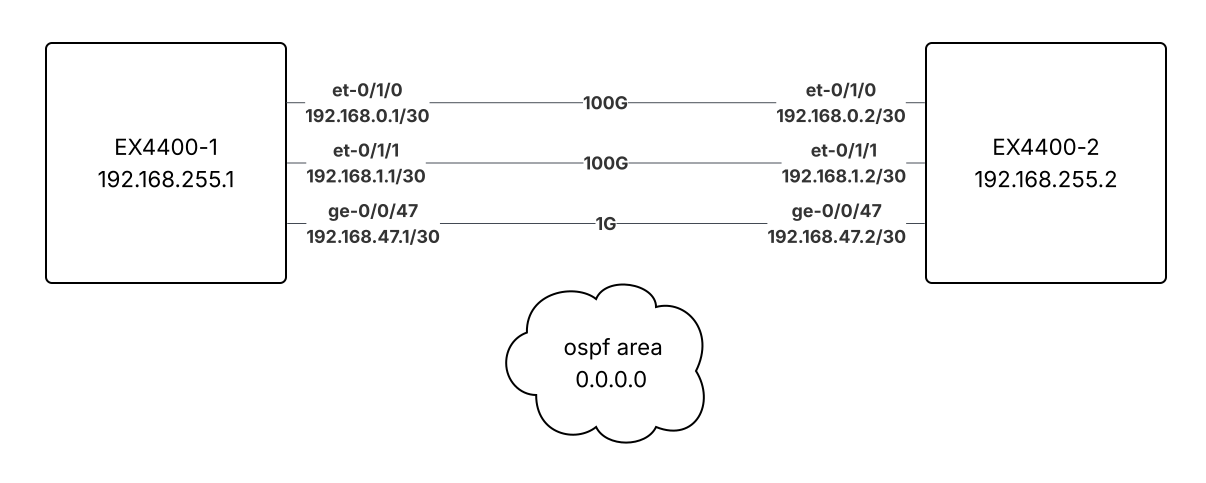
Here's the relevant config, with the differences between the two EX4400s highlighted:
interfaces {
    ge-0/0/47 { # (1)!
        description "To EX4400-2";
        mtu 9216;
        unit 0 {
            family inet {
                address 192.168.47.1/30;
            }
        }
    }
    et-0/1/0 { # (2)!
        description "To EX4400-2";
        mtu 9216;
        unit 0 {
            family inet {
                address 192.168.0.1/30;
            }
        }
    }
    et-0/1/1 { # (3)!
        description "To EX4400-2";
        mtu 9216;
        unit 0 {
            family inet {
                address 192.168.1.1/30;
            }
        }
    }
    lo0 { # (4)!
        description "Loopback";
        unit 0 {
            family inet {
                address 192.168.255.1/32;
            }
        }
    }
}
protocols {
    ospf {
        area 0.0.0.0 { # (5)!
            interface et-0/1/0.0 {
                interface-type p2p;
                metric 10;
            }
            interface et-0/1/1.0 {
                interface-type p2p;
                metric 10;
            }
            interface ge-0/0/47.0 {
                interface-type p2p;
                metric 100;
            }
            interface lo0.0 {
                passive;
            }
        }
    }
}
policy-options { # (6)!
    policy-statement ECMP-Policy {
        then {
            load-balance per-packet;
            accept;
        }
    }
}
routing-options {
    forwarding-table {
        export ECMP-Policy;
    }
}
- This is Gigabit Ethernet port 47 (the last port) on the front panel.
- This is 100 Gigabit Ethernet port 0 (the first port) on the back panel, usually used for stacking on EX4400, but also able to be used as an Ethernet port.
- This is 100 Gigabit Ethernet port 1 (the last port) on the back panel.
- This is the loopback interface, which allows the routing engine to communicate with other hosts on the network. It will be used as the VTEP address and to form BGP neighborships.
- We configure the OSPF protocol with area 0 and attach our three underlay interfaces. The loopback interface is attached in passive mode, meaning its address will be advertised into the OSPF area. Note the higher metric for the Gigabit Ethernet port, as compared to the 100 Gigabit Ethernet ports.
- The
policy-optionsandrouting-optionssections shown here are required to enable ECMP.
interfaces {
    ge-0/0/47 {
        description "To EX4400-1";
        mtu 9216;
        unit 0 {
            family inet {
                address 192.168.47.2/30;
            }
        }
    }
    et-0/1/0 {
        description "To EX4400-1";
        mtu 9216;
        unit 0 {
            family inet {
                address 192.168.0.2/30;
            }
        }
    }
    et-0/1/1 {
        description "To EX4400-1";
        mtu 9216;
        unit 0 {
            family inet {
                address 192.168.1.2/30;
            }
        }
    }
    lo0 {
        description "Loopback";
        unit 0 {
            family inet {
                address 192.168.255.2/32;
            }
        }
    }
}
protocols {
    ospf {
        area 0.0.0.0 {
            interface et-0/1/0.0 {
                interface-type p2p;
                metric 10;
            }
            interface et-0/1/1.0 {
                interface-type p2p;
                metric 10;
            }
            interface ge-0/0/47.0 {
                interface-type p2p;
                metric 100;
            }
            interface lo0.0 {
                passive;
            }
        }
    }
}
policy-options {
    policy-statement ECMP-Policy {
        then {
            load-balance per-packet;
            accept;
        }
    }
}
routing-options {
    forwarding-table {
        export ECMP-Policy;
    }
}
Here we can see that OSPF sessions have established and we are learning routes to switch loopbacks (with ECMP):
admin@EX4400-1> show ospf neighbor

Address          Interface              State           ID               Pri  Dead
192.168.0.2      et-0/1/0.0             Full            192.168.255.2    128    36
192.168.1.2      et-0/1/1.0             Full            192.168.255.2    128    36
192.168.47.2     ge-0/0/47.0            Full            192.168.255.2    128    39
# (1)!

admin@EX4400-1> show route protocol ospf

inet.0: 9 destinations, 9 routes (9 active, 0 holddown, 0 hidden)
+ = Active Route, - = Last Active, * = Both

192.168.255.2/32   *[OSPF/10] 4w5d 04:00:53, metric 10
                    >  to 192.168.0.2 via et-0/1/0.0
                       to 192.168.1.2 via et-0/1/1.0
# (2)!

admin@EX4400-1> show route forwarding-table table default destination 192.168.255.2/32
Routing table: default.inet
Internet:
Destination        Type RtRef Next hop           Type Index    NhRef Netif
192.168.255.2/32   user     1                    ulst   131072     4
                              192.168.0.2        ucst     1800     3 et-0/1/0.0
                              192.168.1.2        ucst     1801     3 et-0/1/1.0
# (3)!

admin@EX4400-1> ping 192.168.255.2 count 3
PING 192.168.255.2 (192.168.255.2): 56 data bytes
64 bytes from 192.168.255.2: icmp_seq=0 ttl=64 time=6.159 ms
64 bytes from 192.168.255.2: icmp_seq=1 ttl=64 time=8.775 ms
64 bytes from 192.168.255.2: icmp_seq=2 ttl=64 time=11.857 ms

--- 192.168.255.2 ping statistics ---
3 packets transmitted, 3 packets received, 0% packet loss
round-trip min/avg/max/stddev = 6.159/8.930/11.857/2.329 ms
- We see an OSPF neighbor on each of our three underlay ports. The Router ID column shows that we are seeing the same neighbor (EX4400-2) on all three ports.
- We have installed a route toward EX4400-2's loopback IP. Notice that we have installed two paths to the destination. The router will forward traffic out both 100 Gigabit Ethernet ports using ECMP. If both 100 Gigabit Ethernet ports were to go down, then the higher-metric Gigabit Ethernet port would become the active forwarding path to reach EX4400-2.
- The JunOS routing table shows accepted paths and best path, but it does not show ECMP paths. We can look at the forwarding table to confirm that we have indeed installed two equal-cost paths to this destination.
admin@EX4400-2> show ospf neighbor

Address          Interface              State           ID               Pri  Dead
192.168.0.1      et-0/1/0.0             Full            192.168.255.1    128    39
192.168.1.1      et-0/1/1.0             Full            192.168.255.1    128    39
192.168.47.1     ge-0/0/47.0            Full            192.168.255.1    128    37
ㅤ

admin@EX4400-2> show route protocol ospf

inet.0: 9 destinations, 9 routes (9 active, 0 holddown, 0 hidden)
+ = Active Route, - = Last Active, * = Both

192.168.255.1/32   *[OSPF/10] 4w5d 04:01:06, metric 10
                    >  to 192.168.0.1 via et-0/1/0.0
                       to 192.168.1.1 via et-0/1/1.0
ㅤ

admin@EX4400-2> show route forwarding-table table default destination 192.168.255.1/32
Routing table: default.inet
Internet:
Destination        Type RtRef Next hop           Type Index    NhRef Netif
192.168.255.1/32   user     1                    ulst   131072     4
                              192.168.0.1        ucst     1800     3 et-0/1/0.0
                              192.168.1.1        ucst     1801     3 et-0/1/1.0
ㅤ

admin@EX4400-2> ping 192.168.255.1 count 3
PING 192.168.255.1 (192.168.255.1): 56 data bytes
64 bytes from 192.168.255.1: icmp_seq=0 ttl=64 time=9.664 ms
64 bytes from 192.168.255.1: icmp_seq=1 ttl=64 time=7.063 ms
64 bytes from 192.168.255.1: icmp_seq=2 ttl=64 time=10.790 ms

--- 192.168.255.1 ping statistics ---
3 packets transmitted, 3 packets received, 0% packet loss
round-trip min/avg/max/stddev = 7.063/9.172/10.790/1.561 ms
- Build the collapsed core
- Underlay
- Establish Ethernet and IP connectivity between core nodes
- Configure underlay routing protocol (OSPF)
- Verify reachability of loopback interfaces
- Overlay
- Establish BGP-EVPN protocols between nodes
- Enable VXLAN dataplane
- MAC/IP VRFs
- Create VLANs and assign VNIs
- Create IRB (layer 3) interfaces in fabric
- Create ESI-LAG and establish VLAN trunk to IDF-1 (layer 2 connected IDF)
- Observe MAC learning and IP routing through the fabric
- Observe anycast gateway behavior
- Underlay
- Dabble in campus fabric
- Extend EVPN fabric into IDF-2 (layer 3 connected IDF)
- Port mirror fabric links and analyze in Wireshark
Overlay
Now we are ready to configure BGP and EVPN:
routing-options {
    router-id 192.168.255.1; # (1)!
    autonomous-system 65100; # (2)!
}
protocols {
    bgp {
        group EVPN-Overlay {
            type internal;
            local-address 192.168.255.1; # (3)!
            family evpn { # (10)!
                signaling;
            }
            local-as 65100;
            multipath;
            neighbor 192.168.255.2; # (4)!
        }
    }
    evpn {
        no-core-isolation; # (5)!
        encapsulation vxlan; # (6)!
        duplicate-mac-detection { # (7)!
            detection-threshold 5;
            detection-window 60;
            auto-recovery-time 5;
        }
        multicast-mode ingress-replication; # (8)!
        extended-vni-list all; # (9)!
    }
}
switch-options {
    vtep-source-interface lo0.0;
    route-distinguisher 192.168.255.1:1; # (11)!
    vrf-target {
        target:65100:1; # (12)!
        auto; # (13)!
    }
}
- By convention, we set our router-id to match our loopback address. However, any 32-bit number that is unique in the network would be acceptable.
- We are using iBGP, so every router in the EVPN fabric will have the same ASN. We have selected a private ASN. See RFC 6996 for more.
- We will form BGP adjacencies using our loopback IP as the source address.
- Our neighbor is the other EX4400's loopback IP, which we can reach because we learned it in OSPF.
- By default, if a router loses all of its EVPN BGP neighbors it will bring down all of its ESI-LAG ports. In a collapsed
core EVPN where we have only two routers speaking BGP, this is disastrous. If EX4400-2 goes down due to failure or
maintenance, EX4400-1 would bring down all ESI-LAG ports, most likely stopping all traffic through the network.
To mitigate this, we enable the
no-core-isolationknob. If we add more EVPN neighbors in the future, we will want to remove this statement. If we have several devices forming a BGP-EVPN fabric and one of them becomes isolated from the rest, it is desirable for that device to bring down links to shift traffic to the healthy nodes. - Configure VXLAN as our dataplane for the EVPN network. Other options are MPLS and SRv6, which are typically used in carrier networks.
- Duplicate MAC detection is a loop prevention mechanism in EVPN. If a MAC address moves from one VTEP to another
frequently, it is suppressed. On JunOS, the default threshold setting is 5 moves within 180 seconds.
This may be appropriate for server networks, but may not be suitable for collapsed core environments
with mobile wireless users. As such, we have adjusted the threshold to 5 moves within 60 seconds.
The
auto-recovery-timespecifies a number of minutes after which the suppressed MAC address will be permitted again. - The
multicast-modesetting specifies the forwarding method for BUM traffic ingressing a VTEP. Inmulticast-mode ingress-replicationmode, the ingress VTEP sends a unicast copy of the BUM traffic to each relevant VTEPs. - This statement enables advertisement of all configured VNIs into the EVPN instance. Alternately, you can specify a list of specific VNIs to be included in the EVPN instance.
- We are enabling the EVPN address family for our overlay. On other types of routers, you may have to disable address families,
such as IPv4, which are enabled by default. Not so in JunOS
 . JunOS comes with very few default/hidden
assumptions built in.
. JunOS comes with very few default/hidden
assumptions built in. - The route distinguisher uniquely identifies EVPN routes originated by this host by tagging the route with its loopback IP.
- The route target is used to keep track of which MAC/IP VRF each EVPN route belongs to. The route target configured here is used specifically for EVPN Type 1 routes.
- The route target is automatically derived for Type 2 and Type 3 routes. The route target for Type 5 routes is defined within each VRF.
routing-options {
    router-id 192.168.255.2;
    autonomous-system 65100;
}
protocols {
    bgp {
        group EVPN-Overlay {
            type internal;
            local-address 192.168.255.2;
            family evpn {
                signaling;
            }
            local-as 65100;
            multipath;
            neighbor 192.168.255.1;
        }
    }
    evpn {
        no-core-isolation;
        encapsulation vxlan;
        duplicate-mac-detection {
            detection-threshold 5;
            detection-window 60;
            auto-recovery-time 5;
        }
        multicast-mode ingress-replication;
        extended-vni-list all;
    }
}
switch-options {
    vtep-source-interface lo0.0;
    route-distinguisher 192.168.255.2:1;
    vrf-target {
        target:65100:1;
        auto;
    }
}
Now we can observe a BGP session up between the two router loopback IPs, with the EVPN address family enabled:
admin@EX4400-1> show bgp summary

Threading mode: BGP I/O
Default eBGP mode: advertise - accept, receive - accept
Groups: 1 Peers: 1 Down peers: 0
Table          Tot Paths  Act Paths Suppressed    History Damp State    Pending
bgp.evpn.0
                       0          0          0          0          0          0
Peer                     AS      InPkt     OutPkt    OutQ   Flaps Last Up/Dwn State|#Active/Received/Accepted/Damped...
192.168.255.2         65100        162        170       0       0     1:01:45 Establ # (1)!
  bgp.evpn.0: 0/0/0/0 # (2)!
  default-switch.evpn.0: 0/0/0/0
  __default_evpn__.evpn.0: 0/0/0/0
- The neighborship is in the "Established" state
- We see the EVPN address family here, and that we have not yet received, accepted, or installed any routes.
admin@EX4400-2> show bgp summary

Threading mode: BGP I/O
Default eBGP mode: advertise - accept, receive - accept
Groups: 1 Peers: 1 Down peers: 0
Table          Tot Paths  Act Paths Suppressed    History Damp State    Pending
bgp.evpn.0
                       0          0          0          0          0          0
Peer                     AS      InPkt     OutPkt    OutQ   Flaps Last Up/Dwn State|#Active/Received/Accepted/Damped...
192.168.255.1         65100        170        162       0       0     1:02:31 Establ
  bgp.evpn.0: 0/0/0/0
  default-switch.evpn.0: 0/0/0/0
  __default_evpn__.evpn.0: 0/0/0/0
- Build the collapsed core
- Underlay
- Overlay
- Establish BGP-EVPN protocols between nodes
- Enable VXLAN dataplane
- MAC/IP VRFs
- Create VLANs and assign VNIs
- Create ESI-LAG and establish VLAN trunk to IDF-1 (layer 2 connected IDF)
- Create IRB (layer 3) interfaces in fabric
- Observe MAC learning and IP routing through the fabric
- Observe anycast gateway behavior
- Dabble in campus fabric
- Extend EVPN fabric into IDF-2 (layer 3 connected IDF)
- Port mirror fabric links and analyze in Wireshark
MAC/IP VRFs
Now that we have our underlay and overlay protocols established, we are ready to put some VLANs and Layer 3 interfaces into the network. Most of this configuration will be the identical on both collapsed core nodes.
We will build these VLANs (MAC VRFs), IRB (layer 3) interfaces, anycast gateways, and IP VRFs:
| VLAN ID | Description | IRB IP | VRF |
|---|---|---|---|
| 101 | Staff Wireless | 10.95.101.1/24 | Staff |
| 102 | Staff Wired | 10.95.102.1/24 | Staff |
| 103 | Guest | 10.95.103.1/24 | Guest |
VLANs (MAC-VRFs) and IRB Interfaces
vlans {
    v101 { # (1)!
        description "Staff Wireless";
        vlan-id 101; # (2)!
        l3-interface irb.101; # (3)!
        vxlan {
            vni 101; # (4)!
        }
    }
    v102 {
        description "Staff Wired";
        vlan-id 102;
        l3-interface irb.102;
        vxlan {
            vni 102;
        }
    }
    v103 {
        description "Guest";
        vlan-id 103;
        l3-interface irb.103;
        vxlan {
            vni 103;
        }
    }
}
interfaces {
    irb {
        unit 101 {
            family inet {
                address 10.95.101.1/24; # (5)!
            }
            mac 02:00:00:c0:ff:ee;  # (6)!
        }
        unit 102 {
            family inet {
                address 10.95.102.1/24;
            }
            mac 02:00:00:c0:ff:ee;
        }
        unit 103 {
            family inet {
                address 10.95.103.1/24;
            }
            mac 02:00:00:c0:ff:ee;
        }
    }
}
- Create a VLAN named
v101 - Assign the VLAN ID
101 - Attach IRB (layer 3) interface
irb.101to the VLAN - Assign the VXLAN VNI
101 - This is our anycast gateway IP, applied to both EX4400s
- We apply a locally-administered MAC address to both EX4400s so that clients don't have to ARP
for a new gatway MAC if one of the core devices goes down. There are other ways to handle this, but
that is outside our scope for today. I chose
02:00:00:c0:ff:eebecause I like coffee, which is an important design consideration.
ESI-LAG VLAN Trunk to IDF-1
Creating VLANs in IDF
vlans { # (1)!
    v101 {
        description "Staff Wireless";
        vlan-id 101;
    }
    v102 {
        description "Staff Wired";
        vlan-id 102;
    }
    v103 {
        description Guest;
        vlan-id 103;
     }
}
- No
l3-interfaceorvxlan vniconfig like we had on the EX4400s, because this is a regular layer 2 connected IDF stack.
Physical interfaces
interfaces {
    ge-0/0/0 { # (1)!
        description "To EX2300-L2";
        ether-options {
            802.3ad ae101; # (2)!
        }
    }
}
- The LAG member port is Gigabit Ethernet port
ge-0/0/0(the first port on each switch) - We are binding the port to aggregated Ethernet device
ae101
interfaces {
    ge-0/0/0 { # (1)!
        description "ae0 member - Uplink";
        ether-options {
            802.3ad ae0;
        }
    }
    ge-0/0/1 {
        description "ae0 member - Uplink";
        ether-options {
            802.3ad ae0;
        }
    }
}
- On this end, we bind ports
ge-0/0/0andge-0/0/1(the first two ports on the switch) to aggregated Ethernet deviceae0
Aggregated Ethernet interfaces
interfaces {
    ae101 { # (1)!
        description "ESI-LAG to EX2300-L2";
        esi {
            auto-derive {
                lacp-pe-system-id-and-admin-key; # (2)!
            }
            all-active;
        }
        aggregated-ether-options {
            lacp {
                active;
                system-id f8:c1:16:4e:7d:00; # (3)!
            }
        }
        unit 0 {
            family ethernet-switching {
                interface-mode trunk;
                vlan {
                    members 101-103; # (4)!
                }
            }
        }
    }
}
- Create aggregated Ethernet device
ae101 - We'll have the system derive the ESI value automatically for us. We could set it manually instead.
- We set a system ID MAC address to be used by LACP and for deriving the ESI value. We must ensure that this value is consistent on both routers participating in the ESI-LAG. Here I have used the chassis MAC of EX4400-1, however any legal value could be used.
- Configure the LAG as a trunk port with VLANs 101 through 103 as tagged members
interfaces {
    ae0 {
        description Uplink;
        # (1)!
        aggregated-ether-options {
            lacp {
                active;
                # (2)!
            }
        }
        unit 0 {
            family ethernet-switching {
                interface-mode trunk;
                vlan {
                    members 101-103;
                }
            }
        }
    }
}
- No ESI config here. This is a single switch (or stack) connecting to what appears to be a single LACP link partner.
- We do not need to set the system ID manually—the switch will derive one from its chassis MAC address.
Now we can observe our LAG ports, LACP member status, and verify that EVPN is aware of the ESI-LAG:
admin@EX4400-1> show interfaces descriptions | match "EX2300-L2|^Int"
Interface       Admin Link Description
ge-0/0/0        up    up   To EX2300-L2
ae101           up    up   ESI-LAG to EX2300-L2

admin@EX4400-1> show lacp interfaces ae101 extensive
Aggregated interface: ae101
    LACP state:           Role   Exp   Def  Dist  Col  Syn  Aggr  Timeout  Activity
      ge-0/0/0           Actor    No    No   Yes  Yes  Yes   Yes     Fast    Active
      ge-0/0/0         Partner    No    No   Yes  Yes  Yes   Yes     Fast    Active
    LACP protocol:        Receive State  Transmit State          Mux State
      ge-0/0/0                  Current   Fast periodic Collecting distributing
    LACP info:        Role     System             System       Port     Port    Port
                             priority         identifier   priority   number     key
      ge-0/0/0       Actor        127  f8:c1:16:4e:7d:00        127        1     102
      ge-0/0/0     Partner        127  a4:e1:1a:aa:95:ce        127        1       1

admin@EX4400-1> show evpn instance esi-info
Instance: default-switch
  Number of ethernet segments: 4
    ESI: 01:f8:c1:16:4e:7d:00:00:66:00
      Status: Resolved by IFL ae101.0
      Local interface: ae101.0, Status: Up/Forwarding
      Number of remote PEs connected: 1
        Remote-PE        MAC-label  Aliasing-label  Mode
        192.168.255.2    0          0               all-active
      DF Election Algorithm: MOD based
      Designated forwarder: 192.168.255.2
      Backup forwarder: 192.168.255.1
      Last designated forwarder update: Apr 29 15:31:45
    ESI: 05:00:00:fe:4c:00:00:00:65:00
      Local interface: irb.101, Status: Up/Forwarding
    ESI: 05:00:00:fe:4c:00:00:00:66:00
      Local interface: irb.102, Status: Up/Forwarding
    ESI: 05:00:00:fe:4c:00:00:00:67:00
      Local interface: irb.103, Status: Up/Forwarding
admin@EX4400-2> show interfaces descriptions | match "EX2300-L2|^Int"
Interface       Admin Link Description
ge-0/0/0        up    up   To EX2300-L2
ae101           up    up   ESI-LAG to EX2300-L2

admin@EX4400-2> show lacp interfaces ae101 extensive
Aggregated interface: ae101
    LACP state:           Role   Exp   Def  Dist  Col  Syn  Aggr  Timeout  Activity
      ge-0/0/0           Actor    No    No   Yes  Yes  Yes   Yes     Fast    Active
      ge-0/0/0         Partner    No    No   Yes  Yes  Yes   Yes     Fast    Active
    LACP protocol:        Receive State  Transmit State          Mux State
      ge-0/0/0                  Current   Fast periodic Collecting distributing
    LACP info:        Role     System             System       Port     Port    Port
                             priority         identifier   priority   number     key
      ge-0/0/0       Actor        127  f8:c1:16:4e:7d:00        127        1     102
      ge-0/0/0     Partner        127  a4:e1:1a:aa:95:ce        127        2       1

admin@EX4400-2> show evpn instance esi-info
Instance: default-switch
  Number of ethernet segments: 4
    ESI: 01:f8:c1:16:4e:7d:00:00:66:00
      Status: Resolved by IFL ae101.0
      Local interface: ae101.0, Status: Up/Forwarding
      Number of remote PEs connected: 1
        Remote-PE        MAC-label  Aliasing-label  Mode
        192.168.255.1    0          0               all-active
      DF Election Algorithm: MOD based
      Designated forwarder: 192.168.255.2
      Backup forwarder: 192.168.255.1
      Last designated forwarder update: Apr 29 15:31:46
    ESI: 05:00:00:fe:4c:00:00:00:65:00
      Local interface: irb.101, Status: Up/Forwarding
    ESI: 05:00:00:fe:4c:00:00:00:66:00
      Local interface: irb.102, Status: Up/Forwarding
    ESI: 05:00:00:fe:4c:00:00:00:67:00
      Local interface: irb.103, Status: Up/Forwarding
admin@EX2300-L2> show interfaces descriptions | match "Uplink|^Int"
Interface       Admin Link Description
ge-0/0/0        up    up   ae0 member - Uplink
ge-0/0/1        up    up   ae0 member - Uplink
ae0             up    up   Uplink

admin@EX2300-L2> show lacp interfaces ae0 extensive
Aggregated interface: ae0
    LACP state:           Role   Exp   Def  Dist  Col  Syn  Aggr  Timeout  Activity
      ge-0/0/0           Actor    No    No   Yes  Yes  Yes   Yes     Fast    Active
      ge-0/0/0         Partner    No    No   Yes  Yes  Yes   Yes     Fast    Active
      ge-0/0/1           Actor    No    No   Yes  Yes  Yes   Yes     Fast    Active
      ge-0/0/1         Partner    No    No   Yes  Yes  Yes   Yes     Fast    Active
    LACP protocol:        Receive State  Transmit State          Mux State
      ge-0/0/0                  Current   Fast periodic Collecting distributing
      ge-0/0/1                  Current   Fast periodic Collecting distributing
    LACP info:        Role     System             System       Port     Port    Port
                             priority         identifier   priority   number     key
      ge-0/0/0       Actor        127  a4:e1:1a:aa:95:ce        127        1       1
      ge-0/0/0     Partner        127  f8:c1:16:4e:7d:00        127        1     102
      ge-0/0/1       Actor        127  a4:e1:1a:aa:95:ce        127        2       1
      ge-0/0/1     Partner        127  f8:c1:16:4e:7d:00        127        1     102
If we put a client into a VLAN and generate some traffic, we can observe MAC learning and layer 2 forwarding through the fabric. Additionally, we can confirm that our layer 3 interfaces are responding.
admin@EX2300-L2> show ethernet-switching table

MAC flags (S - static MAC, D - dynamic MAC, L - locally learned, P - Persistent static, C - Control MAC
           SE - statistics enabled, NM - non configured MAC, R - remote PE MAC, O - ovsdb MAC
           GBP - group based policy, B - Blocked MAC)

Ethernet switching table : 5 entries, 5 learned
Routing instance : default-switch
    Vlan                MAC                 MAC         Age   GBP     Logical                NH        MAC        RTR
    name                address             flags             Tag     interface              Index     property   ID
    v101                02:00:00:c0:ff:ee   D             -           ae0.0                  0                    0
    v101                e8:6a:64:d6:f6:9a   D             -           ge-0/0/11.0            0                    0
    v101                f8:c1:16:4e:84:c1   D             -           ae0.0                  0                    0
    v102                f8:c1:16:4e:84:c1   D             -           ae0.0                  0                    0
    v103                f8:c1:16:4e:84:c1   D             -           ae0.0                  0                    0
admin@EX4400-1> show evpn database
Instance: default-switch
VLAN  DomainId  MAC address        Active source                  Timestamp        IP address
     101        02:00:00:c0:ff:ee  irb.101                        Apr 30 10:02:58  10.95.101.1
     101        e8:6a:64:d6:f6:9a  01:f8:c1:16:4e:7d:00:00:66:00  May 01 12:58:28  10.95.101.5
     102        02:00:00:c0:ff:ee  irb.102                        Apr 30 10:02:58  10.95.102.1
     103        02:00:00:c0:ff:ee  irb.103                        Apr 30 10:02:58  10.95.103.1

admin@EX4400-1> show ethernet-switching table

MAC flags (S - static MAC, D - dynamic MAC, L - locally learned, P - Persistent static, C - Control MAC
           SE - statistics enabled, NM - non configured MAC, R - remote PE MAC, O - ovsdb MAC,
           B - Blocked MAC)

Ethernet switching table : 2 entries, 2 learned
Routing instance : default-switch
   Vlan                MAC                 MAC       GBP    Logical                SVLBNH/      Active
   name                address             flags     tag    interface              VENH Index   source
   v101                e8:6a:64:d6:f6:9a   DLR              ae101.0

admin@EX4400-1> show route table bgp.evpn.0 evpn-mac-address e8:6a:64:d6:f6:9a

bgp.evpn.0: 47 destinations, 47 routes (47 active, 0 holddown, 0 hidden)
+ = Active Route, - = Last Active, * = Both

2:192.168.255.1:1::101::e8:6a:64:d6:f6:9a/304 MAC/IP
                   *[EVPN/170] 00:04:05
                       Indirect
2:192.168.255.2:1::101::e8:6a:64:d6:f6:9a/304 MAC/IP
                   *[BGP/170] 00:04:04, localpref 100, from 192.168.255.2
                      AS path: I, validation-state: unverified
                       to 192.168.0.2 via et-0/1/0.0, Push 101
                    >  to 192.168.1.2 via et-0/1/1.0, Push 101
2:192.168.255.1:1::101::e8:6a:64:d6:f6:9a::10.95.101.5/304 MAC/IP
                   *[EVPN/170] 00:04:04
                       Indirect
2:192.168.255.2:1::101::e8:6a:64:d6:f6:9a::10.95.101.5/304 MAC/IP
                   *[BGP/170] 00:04:04, localpref 100, from 192.168.255.2
                      AS path: I, validation-state: unverified
                    >  to 192.168.0.2 via et-0/1/0.0, Push 101
                       to 192.168.1.2 via et-0/1/1.0, Push 101
IP VRFs
Now that we have configured and verified layer 2 forwarding and layer 3 IRB interfaces in the fabric, let's put those IRBs into VRFs to keep our traffic segregated.
routing-instances {
    vrf-1000-staff { # (1)!
        instance-type vrf;
        interface irb.101; # (2)!
        interface irb.102;
        route-distinguisher 192.168.255.1:1000; # (3)!
        vrf-target target:1000:1; # (4)!
    }
    vrf-2000-guest {
        instance-type vrf;
        interface irb.103;
        route-distinguisher 192.168.255.1:2000;
        vrf-target target:2000:1;
    }
}
- Create a VRF named
vrf-1000-staff - Attach
irb.101andirb.102to this VRF - Establish a unique identifier for EVPN routes originated for this VRF by this router (unique on each EVPN router with interfaces in this VRF)
- Establish a consistent identifier for this VRF in the EVPN (identical on every EVPN router with interfaces in this VRF)
routing-instances {
    vrf-1000-staff {
        instance-type vrf;
        interface irb.101;
        interface irb.102;
        route-distinguisher 192.168.255.2:1000;
        vrf-target target:1000:1;
    }
    vrf-2000-guest {
        instance-type vrf;
        interface irb.103;
        route-distinguisher 192.168.255.2:2000;
        vrf-target target:2000:1;
    }
}
Additionally, let's build an uplink from the Staff VRF to our test firewall so we can route some traffic to the Internet:
vlans {
    v1695 {
        description "Staff VRF to Firewall";
        vlan-id 1695;
        l3-interface irb.1695;
        vxlan {
            vni 1695;
        }
    }
}
interfaces {
    ge-0/0/46 {
        description "ae0 member - Uplink to Firewall";
        ether-options {
            802.3ad ae0;
        }
    }
    ae0 {
        description "ESI-LAG Uplink to Firewall";
        esi {
            auto-derive {
                lacp-pe-system-id-and-admin-key;
            }
            all-active;
        }
        aggregated-ether-options {
            lacp {
                active;
                system-id f8:c1:16:4e:7d:00;
            }
        }
        unit 0 {
            family ethernet-switching {
                interface-mode trunk;
                vlan {
                    members 1695;
                }
            }
        }
    }
    irb {
        unit 1695 {
            description "Staff VRF to Firewall";
            family inet {
                address 10.16.95.254/24;
            }
            mac 02:00:00:c0:ff:ee;
        }
    }
}
routing-instances {
    vrf-1000-staff {
        interface irb.1695;
        routing-options {
            static {
                route 0.0.0.0/0 next-hop 10.16.95.1;
            }
        }
    }
}
Live demo: ping to Internet and demonstrate anycast gateway
- Build the collapsed core
- Underlay
- Overlay
- MAC/IP VRFs
- Create VLANs and assign VNIs
- Create IRB (layer 3) interfaces in fabric
- Create ESI-LAG and establish VLAN trunk to IDF-1 (layer 2 connected IDF)
- Observe MAC learning and IP routing through the fabric
- Observe anycast gateway behavior
- Dabble in campus fabric
- Extend EVPN fabric into IDF-2 (layer 3 connected IDF)
- Port mirror fabric links and analyze in Wireshark
Campus fabric
Using all the same tools, we can extend our fabric into the IDF. This allows us to make connections between closets at layer 3 instead of layer 2. No spanning tree or VLAN trunks to worry about, and freedom of topology. We could build rings, meshes, spine-leaf topologies, or whatever we want.
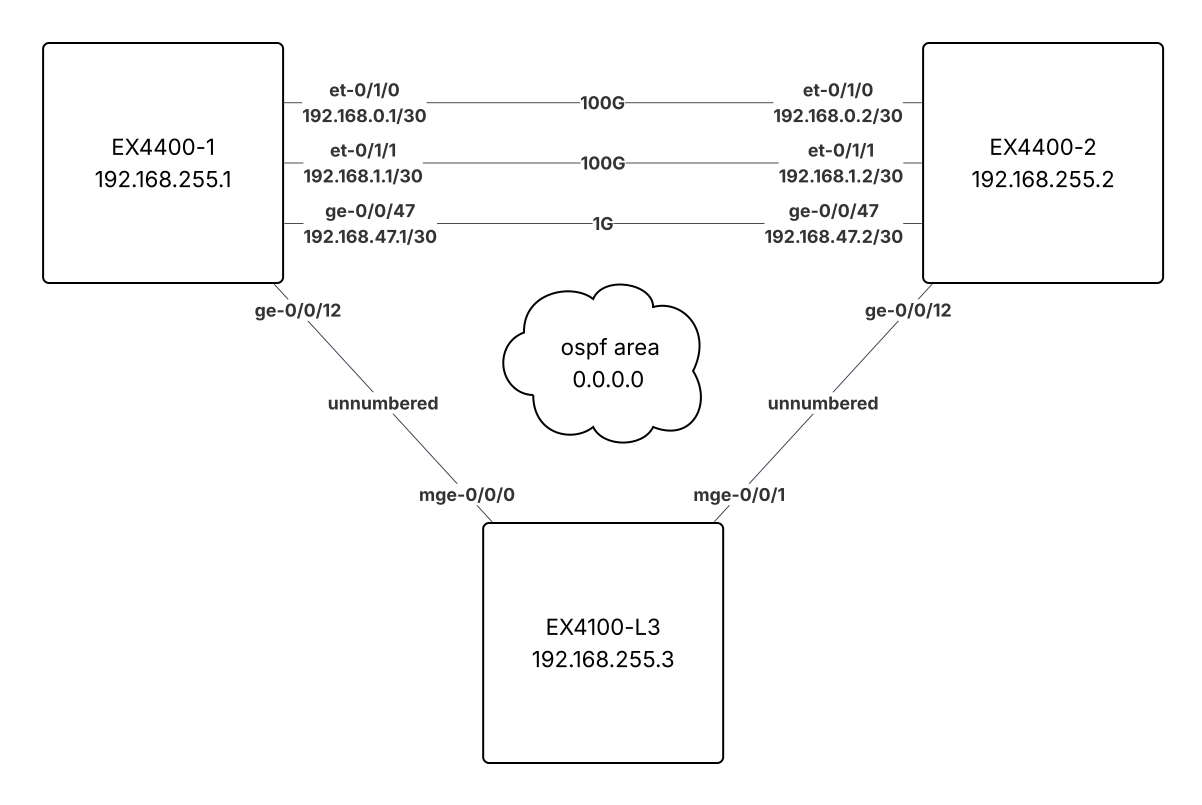
In this section, we will configure EX4100-L3 for IDF-2, as an extension of our EVPN-VXLAN fabric in the core.
Underlay
As before, we need to extend underlay connectivity to the new router. In this case, instead of assigning a transit IP subnet to the links, I am going to configure them as unnumbered.
Here's the topology:
interfaces {
    ge-0/0/12 {
        mtu 9216;
        description "To EX4100-L3";
        unit 0 {
            family inet {
                unnumbered-address lo0.0; # (1)!
            }
        }
    }
}
protocols {
    ospf {
        area 0.0.0.0 {
            interface ge-0/0/12.0 {
                interface-type p2p;
                metric 100;
            }
        }
    }
}
- Use our loopback IP for communication on this unnumbered link.
interfaces {
    ge-0/0/0 {
        mtu 9216;
        description "Uplink to EX4400-1";
        unit 0 {
            family inet {
                unnumbered-address lo0.0;
            }
        }
    }
    ge-0/0/1 {
        mtu 9216;
        description "Uplink to EX4400-2";
        unit 0 {
            family inet {
                unnumbered-address lo0.0;
            }
        }
    }
    lo0 {
        description Loopback;
        unit 0 {
            family inet {
                address 192.168.255.3/32;
            }
        }
    }
}
protocols {
    ospf {
        area 0.0.0.0 {
            interface lo0.0 {
                passive;
            }
            interface ge-0/0/0.0 {
                interface-type p2p;
            }
            interface ge-0/0/1.0 {
                interface-type p2p;
            }
        }
    }
}
Here we can see that OSPF sessions have established and we are learning routes to switch loopbacks (with ECMP):
admin@EX4400-1> show ospf neighbor | match "^Addr|192.168.255.3"
Address          Interface              State           ID               Pri  Dead
192.168.255.3    ge-0/0/12.0            Full            192.168.255.3    128    34

admin@EX4400-1> show route 192.168.255.3

inet.0: 10 destinations, 11 routes (10 active, 0 holddown, 0 hidden)
@ = Routing Use Only, # = Forwarding Use Only
+ = Active Route, - = Last Active, * = Both

192.168.255.3/32   @[OSPF/10] 1d 04:14:59, metric 100
                    >  to 192.168.255.3 via ge-0/0/12.0
                   #[Direct/0] 1d 04:15:02, metric 1
                    >  to 192.168.255.3 via ge-0/0/12.0

admin@EX4400-1> ping 192.168.255.3 count 3
PING 192.168.255.3 (192.168.255.3): 56 data bytes
64 bytes from 192.168.255.3: icmp_seq=0 ttl=64 time=22.553 ms
64 bytes from 192.168.255.3: icmp_seq=1 ttl=64 time=22.303 ms
64 bytes from 192.168.255.3: icmp_seq=2 ttl=64 time=9.498 ms

--- 192.168.255.3 ping statistics ---
3 packets transmitted, 3 packets received, 0% packet loss
round-trip min/avg/max/stddev = 9.498/18.118/22.553/6.096 ms
admin@EX4400-2> show ospf neighbor | match "^Addr|192.168.255.3"
Address          Interface              State           ID               Pri  Dead
192.168.255.3    ge-0/0/12.0            Full            192.168.255.3    128    31

admin@EX4400-2> show route 192.168.255.3

inet.0: 10 destinations, 11 routes (10 active, 0 holddown, 0 hidden)
@ = Routing Use Only, # = Forwarding Use Only
+ = Active Route, - = Last Active, * = Both

192.168.255.3/32   @[OSPF/10] 1d 04:16:29, metric 100
                    >  to 192.168.255.3 via ge-0/0/12.0
                   #[Direct/0] 1d 04:16:36, metric 1
                    >  to 192.168.255.3 via ge-0/0/12.0

admin@EX4400-2> ping 192.168.255.3 count 3
PING 192.168.255.3 (192.168.255.3): 56 data bytes
64 bytes from 192.168.255.3: icmp_seq=0 ttl=64 time=9.308 ms
64 bytes from 192.168.255.3: icmp_seq=1 ttl=64 time=11.555 ms
64 bytes from 192.168.255.3: icmp_seq=2 ttl=64 time=14.398 ms

--- 192.168.255.3 ping statistics ---
3 packets transmitted, 3 packets received, 0% packet loss
round-trip min/avg/max/stddev = 9.308/11.754/14.398/2.083 ms
admin@EX4100-L3> show ospf neighbor

Address          Interface              State           ID               Pri  Dead
192.168.255.1    mge-0/0/0.0            Full            192.168.255.1    128    36
192.168.255.2    mge-0/0/1.0            Full            192.168.255.2    128    37

admin@EX4100-L3> show route 192.168.255.0/24

inet.0: 7 destinations, 9 routes (7 active, 0 holddown, 0 hidden)
Limit/Threshold: 32768/32768 destinations
@ = Routing Use Only, # = Forwarding Use Only
+ = Active Route, - = Last Active, * = Both

192.168.255.1/32   @[OSPF/10] 1d 04:18:14, metric 1
                    >  to 192.168.255.1 via mge-0/0/0.0
                   #[Direct/0] 1d 04:18:14, metric 1
                    >  to 192.168.255.1 via mge-0/0/0.0
192.168.255.2/32   @[OSPF/10] 1d 04:18:07, metric 1
                    >  to 192.168.255.2 via mge-0/0/1.0
                   #[Direct/0] 1d 04:18:12, metric 1
                    >  to 192.168.255.2 via mge-0/0/1.0
192.168.255.3/32   *[Direct/0] 1d 04:22:55
                    >  via lo0.0

admin@EX4100-L3> ping 192.168.255.1 count 3
PING 192.168.255.1 (192.168.255.1): 56 data bytes
64 bytes from 192.168.255.1: icmp_seq=0 ttl=64 time=16.495 ms
64 bytes from 192.168.255.1: icmp_seq=1 ttl=64 time=15.271 ms
64 bytes from 192.168.255.1: icmp_seq=2 ttl=64 time=14.247 ms

--- 192.168.255.1 ping statistics ---
3 packets transmitted, 3 packets received, 0% packet loss
round-trip min/avg/max/stddev = 14.247/15.338/16.495/0.919 ms

admin@EX4100-L3> ping 192.168.255.2 count 3
PING 192.168.255.2 (192.168.255.2): 56 data bytes
64 bytes from 192.168.255.2: icmp_seq=0 ttl=64 time=17.691 ms
64 bytes from 192.168.255.2: icmp_seq=1 ttl=64 time=12.264 ms
64 bytes from 192.168.255.2: icmp_seq=2 ttl=64 time=14.075 ms

--- 192.168.255.2 ping statistics ---
3 packets transmitted, 3 packets received, 0% packet loss
round-trip min/avg/max/stddev = 12.264/14.677/17.691/2.256 ms
Overlay
Now we enable EVPN on EX4100-L3 and establish BGP sessions with both core devices.
protocols {
    bgp {
        group EVPN-Overlay {
            neighbor 192.168.255.3; # (1)!
        }
    }
    evpn {
-       no-core-isolation; # (2)!
    }
}
- Adding the BGP neighbor for the new router
- Now we want to remove
no-core-isolationstatement. If you recall, the core isolation feature brings down Ethernet Segments if the router loses all of its BGP neighbors. When we only have two routers, we don't want this behavior because we can't establish quorum. Now that we're adding a third EVPN router, we have a tie-breaking vote and can use this feature again.
routing-options {
    router-id 192.168.255.3;
    autonomous-system 65100;
}
protocols {
    bgp {
        group EVPN-Overlay {
            type internal;
            local-address 192.168.255.3;
            family evpn {
                signaling;
            }
            local-as 65100;
            multipath;
            neighbor 192.168.255.1;
            neighbor 192.168.255.2;
        }
    }
    evpn {
        encapsulation vxlan;
        duplicate-mac-detection {
            detection-threshold 5;
            detection-window 60;
            auto-recovery-time 5;
        }
        multicast-mode ingress-replication;
        extended-vni-list all;
    }
}
switch-options {
    vtep-source-interface lo0.0;
    route-distinguisher 192.168.255.3:1;
    vrf-target {
        target:65100:1;
        auto;
    }
}
admin@EX4400-1> show bgp summary

Threading mode: BGP I/O
Default eBGP mode: advertise - accept, receive - accept
Groups: 1 Peers: 2 Down peers: 0
Table          Tot Paths  Act Paths Suppressed    History Damp State    Pending
bgp.evpn.0
                      20         20          0          0          0          0
Peer                     AS      InPkt     OutPkt    OutQ   Flaps Last Up/Dwn State|#Active/Received/Accepted/Damped...
192.168.255.2         65100       6637       6653       0       0  2d 0:19:18 Establ
  bgp.evpn.0: 20/20/20/0
  default-switch.evpn.0: 18/18/18/0
  __default_evpn__.evpn.0: 2/2/2/0
192.168.255.3         65100         13         37       0       0        4:31 Establ
  bgp.evpn.0: 0/0/0/0
  default-switch.evpn.0: 0/0/0/0
  __default_evpn__.evpn.0: 0/0/0/0
admin@EX4100-L3> show bgp summary

Threading mode: BGP I/O
Default eBGP mode: advertise - accept, receive - accept
Groups: 1 Peers: 2 Down peers: 0
Table          Tot Paths  Act Paths Suppressed    History Damp State    Pending
bgp.evpn.0
                      26         26          0          0          0          0
Peer                     AS      InPkt     OutPkt    OutQ   Flaps Last Up/Dwn State|#Active/Received/Accepted/Damped...
192.168.255.1         65100         38         12       0       0        4:36 Establ
  bgp.evpn.0: 4/4/4/0
  default-switch.evpn.0: 4/4/4/0
  __default_evpn__.evpn.0: 0/0/0/0
192.168.255.2         65100         35         11       0       0        4:09 Establ
  bgp.evpn.0: 4/4/4/0
  default-switch.evpn.0: 4/4/4/0
  __default_evpn__.evpn.0: 0/0/0/0
Creating VLANs in IDF
vlans {
    v101 {
        description "Staff Wireless";
        vlan-id 101;
        vxlan {
            vni 101; # (1)!
        }
    }
    v102 {
        description "Staff Wired";
        vlan-id 102;
        vxlan {
            vni 102;
        }
    }
    v103 {
        description Guest;
        vlan-id 103;
        vxlan {
            vni 103;
        }
     }
}
- This time we add the VXLAN VNI config, since these VLANs will be carried over the VXLAN, not an uplink trunk.
Let's put a client PC in VLAN 101 on IDF-2 and have a look at the MAC tables and EVPN database across the network.
admin@EX4100-L3> show evpn database
Instance: default-switch
VLAN  DomainId  MAC address        Active source                  Timestamp        IP address
     101        02:00:00:c0:ff:ee  192.168.255.1                  May 01 11:20:18  10.95.101.1
     101        e8:6a:64:d6:f6:9a  ge-0/0/47.0                    May 01 12:43:57  10.95.101.5
                                                                                   fe80::e1ef:9064:1486:1851
     102        02:00:00:c0:ff:ee  192.168.255.1                  May 01 11:20:18  10.95.102.1
     103        02:00:00:c0:ff:ee  192.168.255.1                  May 01 11:20:18  10.95.103.1

admin@EX4100-L3> show ethernet-switching table

MAC flags (S - static MAC, D - dynamic MAC, L - locally learned, P - Persistent static, C - Control MAC
           SE - statistics enabled, NM - non configured MAC, R - remote PE MAC, O - ovsdb MAC,
           B - Blocked MAC)

Ethernet switching table : 4 entries, 4 learned
Routing instance : default-switch
   Vlan                MAC                 MAC       GBP    Logical                SVLBNH/      Active
   name                address             flags     tag    interface              VENH Index   source
   v101                02:00:00:c0:ff:ee   DR               vtep.32769                          192.168.255.1
   v101                e8:6a:64:d6:f6:9a   D                ge-0/0/47.0
   v102                02:00:00:c0:ff:ee   DR               vtep.32769                          192.168.255.1
   v103                02:00:00:c0:ff:ee   DR               vtep.32769                          192.168.255.1
admin@EX4400-1> show evpn database
Instance: default-switch
VLAN  DomainId  MAC address        Active source                  Timestamp        IP address
     101        02:00:00:c0:ff:ee  irb.101                        Apr 30 10:02:58  10.95.101.1
     101        e8:6a:64:d6:f6:9a  192.168.255.3                  May 01 12:43:57  10.95.101.5
                                                                                   fe80::e1ef:9064:1486:1851
     102        02:00:00:c0:ff:ee  irb.102                        Apr 30 10:02:58  10.95.102.1
     103        02:00:00:c0:ff:ee  irb.103                        Apr 30 10:02:58  10.95.103.1
     1695       02:00:00:c0:ff:ee  irb.1695                       Apr 30 10:03:29  10.16.95.254
     1695       c8:29:c8:72:42:01  01:f8:c1:16:4e:7d:00:00:01:00  Apr 30 10:06:49  10.16.95.1

admin@EX4400-1> show ethernet-switching table

MAC flags (S - static MAC, D - dynamic MAC, L - locally learned, P - Persistent static, C - Control MAC
           SE - statistics enabled, NM - non configured MAC, R - remote PE MAC, O - ovsdb MAC,
           B - Blocked MAC)


Ethernet switching table : 2 entries, 2 learned
Routing instance : default-switch
   Vlan                MAC                 MAC       GBP    Logical                SVLBNH/      Active
   name                address             flags     tag    interface              VENH Index   source
   v101                e8:6a:64:d6:f6:9a   DR               vtep.32770                          192.168.255.3
   v1695               c8:29:c8:72:42:01   DLR              ae0.0

admin@EX4400-1> show route table bgp.evpn.0 evpn-mac-address e8:6a:64:d6:f6:9a
bgp.evpn.0: 44 destinations, 44 routes (44 active, 0 holddown, 0 hidden)
+ = Active Route, - = Last Active, * = Both

2:192.168.255.3:1::101::e8:6a:64:d6:f6:9a/304 MAC/IP
                   *[BGP/170] 00:05:56, localpref 100
                      AS path: I, validation-state: unverified
                    >  to 192.168.255.3 via ge-0/0/12.0, Push 101
2:192.168.255.3:1::101::e8:6a:64:d6:f6:9a::10.95.101.5/304 MAC/IP
                   *[BGP/170] 00:05:00, localpref 100
                      AS path: I, validation-state: unverified
                    >  to 192.168.255.3 via ge-0/0/12.0, Push 101
2:192.168.255.3:1::101::e8:6a:64:d6:f6:9a::fe80::e1ef:9064:1486:1851/304 MAC/IP
                   *[BGP/170] 00:04:59, localpref 100
                      AS path: I, validation-state: unverified
                    >  to 192.168.255.3 via ge-0/0/12.0, Push 101
Extra Credit
The IDF-2 switch can participate in the anycast gateway just like the core devices. Testing this is left as an exercise for the reader.
- Build the collapsed core
- Dabble in campus fabric
- Extend EVPN fabric into IDF-2 (layer 3 connected IDF)
- Port mirror fabric links and analyze in Wireshark
Wireshark
If you came to Tech Talk Live and didn't get to look at packet captures, did you even come to Tech Talk Live?!
Live demo: If we bring down the 100 Gigabit Ethernet links between our core devices and mirror Gigabit Ethernet port 0/0/47, we can take a live look at the packets on the wire that make all this stuff work.
- Build the collapsed core
- Dabble in campus fabric
- Port mirror fabric links and analyze in Wireshark